 CaptureXRecCaptureXRec
Two switches, one file
The microphone and the computer's own output are separate controls — turn either on by itself, and adjust one mid-setup without disturbing the other's setting.
Turn on system audio by itself to pull in exactly what's coming through the speakers — a call, a match, a streaming track — while whatever is happening around you stays out of it.
Keep system audio off and speak into just the microphone to talk through what's happening on screen, uncompeted by anything the computer itself is playing.
Whichever mix you dialed in lands in the finished MP4 as AAC alongside the H.264 picture — no separate audio file waits to be matched up afterward.
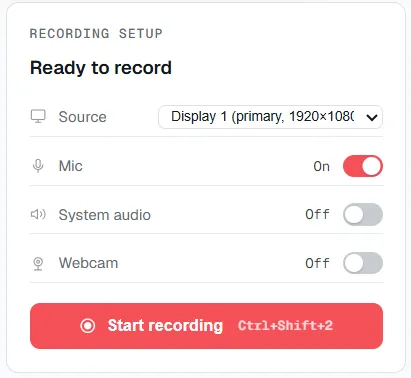
Microphone and system audio are two separate switches — set them independently before you start recording.
Bring the setup panel into view before starting a take — no menu digging required.
Select the source for this particular take — a window, a slice of the screen, or the whole display.
Dial in exactly the sound this take needs: voice alone, app output alone, both together, or neither.
Press record, and whatever combination was set gets baked into the output automatically, no extra step required.
Supported on
Windows 10 (1809+) · Windows 11 · x64 · ARM64
Yes — the microphone and system audio are two separate toggles, so both can be on together, one alone, or neither.
Yes — switch on system audio and leave the microphone off, and only what the computer is playing gets captured.
One file — whatever audio you captured is written into the same MP4 as the screen video, not a separate track to merge later.
AAC audio inside the same MP4 container as the H.264 video — a standard combination that opens in any player.
$12.49, once.
Buy on Microsoft Store — $12.49